You do not need to install anything to use temp mail on a phone. The App Store and Play Store are full of disposable-email apps asking for install space, permissions, and ad impressions to do what a browser tab does in 20 seconds with none of the above. This guide covers the three real routes to a disposable address on iPhone or Android — browser, built-in aliases, and apps — and is specific about what each one costs you, because "free" temp mail apps are monetized somehow, and it's usually with your attention and data.
If you're new to disposable email entirely, what is a temporary email covers the concept; this post is purely about doing it well on a phone.
Quick answer
Open a temp mail site in your phone's browser — tempmaily.co generates a live address the moment the page loads, no install or signup. Copy it, paste it into the signup, and read the code back in the same tab; the whole loop takes about 20 seconds. Use Apple's Hide My Email (or an alias service) instead when you intend to keep the account, and consider a dedicated app only if you need push notifications for an inbox you check all day.
The three routes
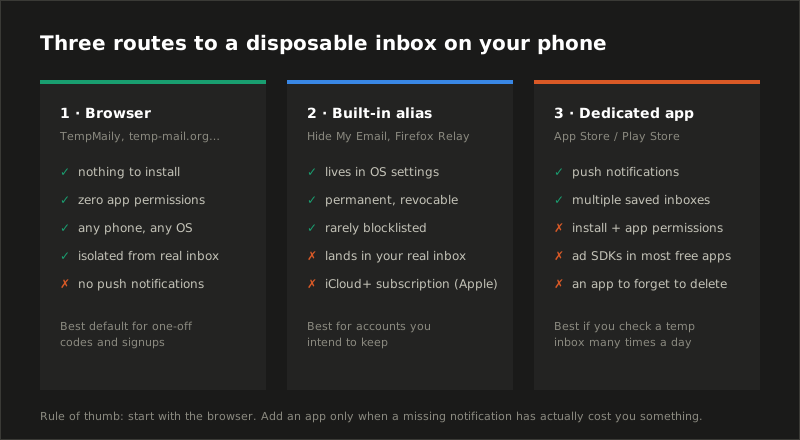
Start with the browser. It is the least-privilege option by a wide margin: a web page cannot read your contacts, track your location, or sit resident showing you ads. Add the other two routes only when a specific need appears — a kept account (route 2) or push notifications (route 3).
Route 1: the browser — 20 seconds, zero installs
Receiving email requires nothing from your phone. No permission, no background service, no account — an inbox is just a web page that updates itself. Which makes the flow this short:
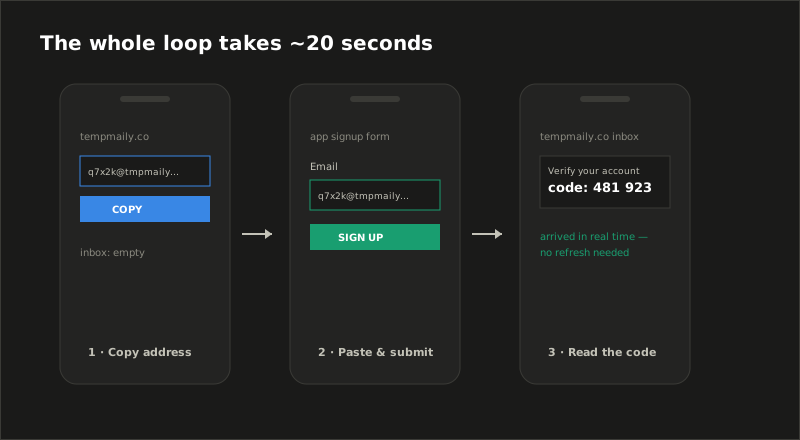
In practice: open tempmaily.co in Safari or Chrome — the address already exists when the page loads. Tap copy, switch to the app or site demanding an email, paste, submit, switch back. The message lands in the visible inbox in real time (there's a countdown showing the next automatic check, so you're never blind-refreshing). The free inbox lives 24 hours, which covers slow codes and second verifications — the timing failures we broke down in the 10 Minute Mail alternatives post.
Two mobile-specific tips:
- Add to Home Screen. Share menu → Add to Home Screen (Safari) or ⋮ → Add to Home Screen (Chrome). You get an app-style icon that opens straight into the inbox — the sole real convenience an app offers, minus the install.
- Watch your autofill. The most common way people accidentally hand over their real address on mobile is the keyboard's email autofill firing in the signup field. Paste the temp address deliberately; don't tap the suggestion.
Route 2: built into your phone — aliases, not throwaways
iPhone and Android both ship (or nearly ship) an adjacent tool that gets confused with temp mail:
- Apple Hide My Email (Settings → your name → iCloud, requires paid iCloud+): generates
random@icloud.comrelay addresses on demand, including directly in Safari's email-field suggestions. - Firefox Relay on Android fills the same slot from the browser side; Gmail's
+trick (which is not really disposable) is the poor cousin.
These are aliases: permanent addresses that forward into your real inbox. That's the point — and the difference:
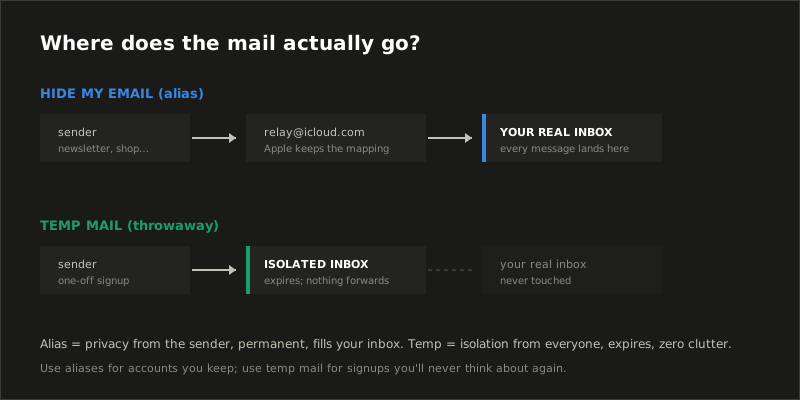
Use an alias when you intend to keep the account but hide your address from the sender — shopping, newsletters, anything with a login you'll reuse. Use temp mail when the whole relationship is disposable: the mail never enters your real inbox, and there is no permanent alias-to-you mapping held by anyone. The full comparison lives in email alias vs temp mail.
Route 3: dedicated apps — pay in permissions
The stores are full of temp mail apps, some from reputable services (temp-mail.org ships official apps), many from anonymous operators. The honest case for one: push notifications when mail lands, and saved multiple inboxes. If you check disposable inboxes many times a day, that's real.
The costs are just as real:
- Ad SDKs. Free temp mail apps are overwhelmingly ad-monetized, which means an embedded ad network observing usage inside an app you chose for privacy. The irony writes itself.
- Permissions and residency. An app can ask for notifications, tracking consent, and whatever else it fancies; it sits installed, logged, and updatable. A browser tab evaporates.
- Impersonators. Search results for a known brand in either store include lookalikes. If you install one, verify the developer matches the service's website.
TempMaily deliberately has no native app — the mobile browser experience is the product. If you need mail landing somewhere you get notifications anyway, Premium forwarding pushes messages to your real inbox, which your phone already notifies you about.
Which route for which job
| You're doing… | Use |
|---|---|
| One-off signup, download, WiFi portal | Browser temp mail (free) |
| Account you'll keep, hide address from sender | Hide My Email / alias service |
| Testing your own app's signup flow repeatedly | Browser + API-driven inboxes |
| Checking a throwaway inbox all day, every day | A reputable dedicated app — or rethink the workflow |
| Anything with money or recovery attached | Your real inbox. Full stop. |
Common mistakes on mobile
- Installing an app for a one-time job. The 20-second browser loop beats a 2-minute install for anything you do less than daily.
- Using Hide My Email as a throwaway. Every "disposable" signup lands in your real iCloud inbox forever until you go revoke the alias. Aliases are for keeping, not burning.
- Letting autofill leak your real address. One tap on the keyboard suggestion defeats the entire exercise.
- Using temp mail for app-store or platform accounts. Your Apple ID, Google account, or anything holding purchases needs recovery — temp mail is the wrong tool there, on any device.
- Trusting a lookalike app. If it isn't linked from the service's own website, treat it as someone else's app wearing the brand.
Try it from the phone you're holding
Odds are decent you're reading this on a phone: open the TempMaily inbox in a new tab and the address is already live — that's the entire setup. Add it to your home screen if it earns the spot. And when a signup form rejects the shared domain, that's not a mobile problem; that's why some sites block temp mail, and a custom domain is the durable fix.
Sources
- Apple — iCloud+ Hide My Email — how relay aliases work and the iCloud+ requirement.
- Mozilla Firefox Relay — the email-mask model on the Android/browser side.
- Hu, Peng & Wang, Towards Understanding the Adoption and Security Risks of Disposable Email Services, IEEE S&P 2019 — background on what accumulates in disposable inboxes and why isolation from your real inbox matters.