The Gmail dot trick is one sentence: Gmail ignores dots in the part before the @, so johnsmith@gmail.com, john.smith@gmail.com, and j.o.h.n.smith@gmail.com are all the same inbox — a fact Google documents plainly. What the one-line version leaves out is where the trick fails: Google Workspace accounts don't do this at all, a growing share of websites normalize dots away before checking if an email is "new," and every variant still ties straight to your identity. This guide covers the mechanics, the legitimate uses, the caveats Google itself publishes, and the point where you need a different tool.
We run TempMaily, a temporary email service — which is the tool we'll recommend for the jobs the dot trick cannot do, so weigh that disclosure as you read.
Quick answer
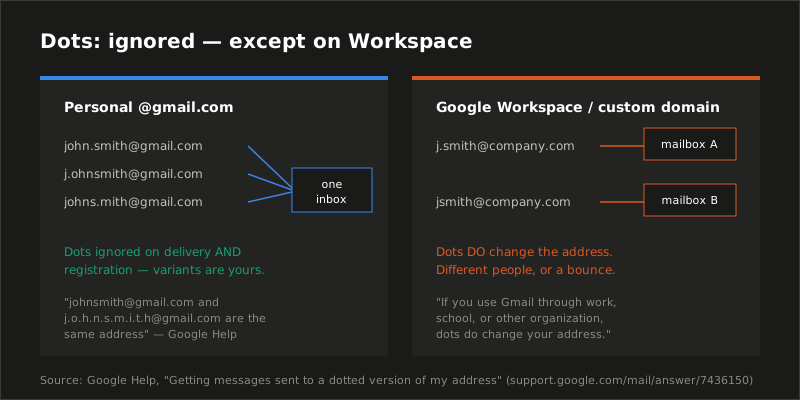
For personal @gmail.com addresses, Google treats all dot placements in the username as one address: dots are ignored on delivery, and you cannot register a Gmail address that differs from an existing one only by dots. This makes dotted variants useful as free aliases of one inbox — for filtering, and for spotting who shared your address. It does not work on Google Workspace (work/school/custom-domain) accounts, it does not create anonymity, and it increasingly does not fool signup forms, which normalize Gmail addresses server-side. For genuinely separate or disposable addresses, use plus addressing, an alias service, or a temp mail inbox.
How the trick works
Gmail's addressing rule for personal accounts has two halves, and both are official, documented behavior rather than folklore:
- Delivery ignores dots. Mail sent to any dotted arrangement of your username lands in your inbox. Google's help page is unambiguous: "If someone accidentally adds dots to your address when emailing you, you'll still get that email."
- Registration ignores dots too. Nobody can create
j.ohnsmith@gmail.comifjohnsmith@gmail.comexists — Google considers them the same username. Your dotted variants are yours by construction; there is no risk a stranger registers one.
The practical consequence: a personal Gmail account comes with a combinatorial supply of aliases you never signed up for. A ten-letter username has 512 possible dot arrangements, every one of them deliverable to you.
The caveat that surprises people: none of this applies to Gmail accounts on Google Workspace — the paid Gmail used by companies, schools, and anyone on a custom domain. Google's documentation states it directly: if you use Gmail through work or school, "dots do change your address." j.smith@yourcompany.com and jsmith@yourcompany.com are different mailboxes that can belong to different people. Test before relying on anything below from a work account.
Three legitimate uses
1. Source-tagging without revealing the tag
Give each service a distinct dot pattern — john.smith@ for shopping, johns.mith@ for newsletters — and the To: header of every incoming mail tells you which one leaked or sold your address. Plus addressing does this more readably (john+amazon@), but the plus tag advertises itself and is trivially stripped by anyone laundering address lists; dot patterns look like ordinary addresses. The cost: you must keep your own map of which pattern went where, because nothing in the address names the source.
2. Filtering into folders
Gmail filters match the full To: address, dots included. A filter on to:(johns.mith@gmail.com) labels and archives everything sent to that variant — a lightweight routing system with no setup beyond the filter itself. For heavier use, plus addressing remains the cleaner mechanism since the tag is self-describing.
3. Recovering a "taken" address mystery
Understanding the rule dissolves a common support mystery: you receive mail obviously meant for someone else, addressed to a dotted variant of your username. Nobody hacked anything — a stranger with a similar name typed your address (dots or not, it is all yours) into a form. The rule also means you can safely tell a service "that dotted address is me" when its support team is confused about duplicates.
Where the dot trick fails — and what to use instead
Failure 1: multiple-account signups
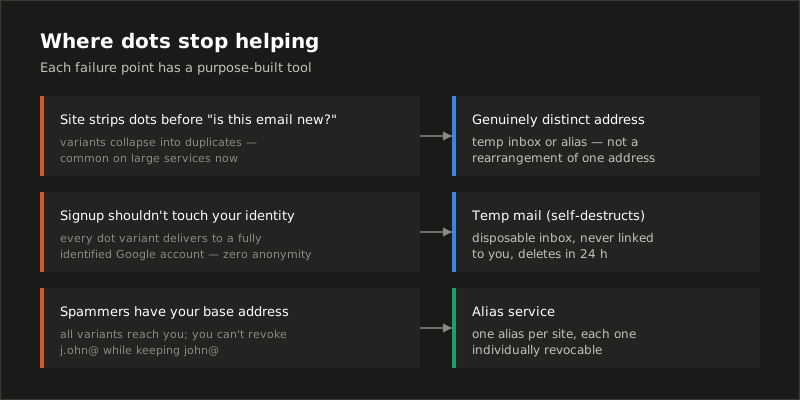
The folk use of the dot trick — registering "different" accounts on the same site — is dying on two fronts. Technically: mainstream services increasingly canonicalize Gmail addresses (lowercase, strip dots, drop plus tags) before uniqueness checks, so variants collapse into duplicates. Policy-wise: multi-accounting typically violates terms of service regardless of the email mechanics, and platforms correlate far more than email — device, payment method, phone, IP. We cover the same reality for disposable addresses in why websites block temp mail: the address is rarely the only signal.
Failure 2: anything requiring anonymity
Every dot variant delivers to the inbox of one Google account with your name, your recovery phone, your search history. The dot trick is an organizational feature of a fully-identified inbox. If the job is keeping your identity out of a signup — a sketchy download, a Wi-Fi portal, a one-time verification — the tool is a disposable inbox that self-destructs and was never linked to you, not a rearrangement of your permanent address. The threat models differ enough that we wrote them up separately: can temporary emails be traced?
Failure 3: spam that has your canonical address
Tagging identifies leakers, but once spammers have your base address (dots stripped), every variant reaches you and there is nothing to revoke — you cannot turn off j.ohn@ while keeping john@. Alias services (SimpleLogin, addy.io, Apple Hide My Email) fix precisely this: each alias forwards to you and dies individually when burned. The full comparison is in email alias vs temp mail.
The right tool per job, in one table
| Job | Right tool | Why not the dot trick |
|---|---|---|
| See who leaked your address | Dot trick or plus addressing | — it's the right tool (plus is more readable) |
| Auto-filing mail into folders | Plus addressing | Tags are self-describing; dots need a manual map |
| Signup you'll forget tomorrow | Temp mail | Dots keep your real inbox in the blast radius |
| Long-term account, revocable address | Alias service | Dot variants can't be individually killed |
| Separate identity per account | Alias or custom-domain inbox | All dot variants are one identity |
| Testing signup flows in code | Receiving API | Normalization breaks dotted "unique" emails |
That last row bites quietly: test suites that generate user.1@, us.er1@ style variants against Gmail addresses collide the moment the system under test normalizes. Fresh inboxes per test — the pattern in our email testing guides — sidestep normalization entirely.
Common mistakes
- Relying on it from a work or school account. The Workspace exception is the most-skipped line in Google's documentation. On custom domains, dots make different addresses — a mistyped dot pattern is someone else's mailbox or a bounce.
- Treating variants as private. Anyone who knows your base address knows every variant. Dot patterns are obscurity, not access control — there is no password on a dot.
- Using it where terms prohibit multi-accounting. The email trick working does not make the second account allowed; enforcement usually arrives via payment or device signals you can't rearrange.
- Confusing Gmail's rule with a universal one. Dots are significant almost everywhere else. Outlook, Yahoo, iCloud, and standard mail servers treat
j.ohnandjohnas different users; the trick is a Gmail-specific behavior.
When you're done rearranging dots
The dot trick is a good inbox-organization hack and a poor privacy tool. The moment a signup shouldn't touch your real inbox at all, that's the job we built for: open TempMaily and you have a private disposable address for the next 24 hours — no signup, no dots to bookkeep, and it deletes itself when the job is done.
Sources
- Google, Getting messages sent to a dotted version of my address — the official statement that dots are ignored for personal Gmail, and the explicit Workspace exception ("dots do change your address").
- Google, Create a Gmail account — username availability rules, including dot-variant collisions with existing usernames.
- Our companion guides: temp mail vs Gmail plus addressing and email alias vs temp mail — the adjacent mechanisms compared throughout this post.