Type "fake email generator" into Google and the results mix two tools that share a name and nothing else. One kind invents an email-shaped string and stops — nothing behind it, no inbox, and if the domain is real, mail goes to a stranger. The other mints an address with a live inbox attached, which is the only kind that helps when a form says "we've sent you a confirmation link." Knowing which kind you're holding is the entire skill. This guide sorts the category, flags the one genuinely risky habit, and gives the right generator for each of the four jobs people arrive with.
We operate TempMaily, whose fake email generator is the receiving kind — that's the disclosure, and also the distinction the rest of this post explains.
Quick answer
A generate-only tool (random string tools, faker libraries, identity generators) produces addresses for data: form-validation checks, database fixtures, UI mockups. Point them at the reserved domains — example.com or the .test TLD, set aside by RFC 2606 so they can never belong to anyone — and they're perfectly safe. A receiving generator produces addresses for mail: it invents the address on a domain the service controls and runs a real inbox behind it, so signup codes actually arrive. That's what a temp-mail generator is. The one thing never to do sits between the two: inventing an address at a real domain you don't control — something@gmail.com, a plausible string at a company domain — and typing it into a live form. Either it bounces, or a real stranger receives your verification mail and, with it, the reset button for the account you just created.
The two machines behind one name
Generate-only: strings for systems that shouldn't send
Faker libraries, "random email generator" pages, and fake-identity sites all do the same operation: pick a name-like local part, pick a domain, join with an @. The output is data. Ten thousand of them seed a staging database; one of them checks that your form rejects a missing @. No mail is meant to move, so the quality bar is "parses correctly," not "exists."
The entire safety question for this kind is the domain. The IETF reserved example.com, example.net, example.org, and the top-level domains .test, .invalid, and .localhost precisely so that made-up identifiers have somewhere to live that can never collide with a real person (RFC 2606). anything@example.com is guaranteed ownerless forever. A generator that instead fabricates strings at gmail.com or random plausible company domains is manufacturing little accidents: those domains have owners, some of those local parts have owners too, and any system that later sends to the "fixture" data emails real people. If you inherit a seed script full of realistic domains, converting it to example.com is a ten-minute fix that removes a whole class of incident.
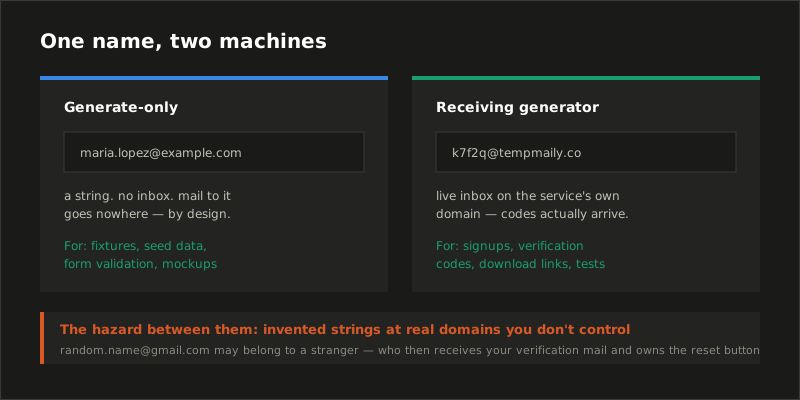
Receiving: addresses with an inbox behind them
The second machine looks similar for the first half-second — it also invents an address — then diverges completely: the domain belongs to the service, the service runs mail servers with real MX records, and the invented address is a working inbox you're looking at. Enter it into a signup form and the confirmation message appears in your browser a few seconds later. (The plumbing that makes that work is its own topic; we walked through it in how temporary email services work.)
This is the kind you need whenever the flow round-trips through email: verification codes, download links, free-trial confirmations, one-time passwords. It's also the kind with real product differences worth checking — whether inboxes are private or publicly readable (a 2019 IEEE Security & Privacy study found tens of thousands of registration and reset emails sitting in public disposable inboxes anyone could open), how long the inbox lives, and whether the service's domains are so widely blocklisted that forms reject them — the trade we covered in why websites block temp mail.
The "fake Gmail" dead end
A steady stream of searchers wants a fake email generator that produces Gmail addresses specifically, presumably because forms trust the domain. It doesn't exist, and the sites claiming otherwise resolve to one of two disappointments. Some emit random @gmail.com strings — addresses that either bounce or belong to actual people, which puts you one typo away from a stranger receiving your account's reset emails. Others repackage Gmail's own address tricks: dots and plus tags, which generate cosmetic variants of your inbox — every one delivering to the same fully identified account, creating exactly zero new identities. We took the dot trick apart in its own post; the summary is that it's an inbox-organization feature wearing a privacy costume. An address that isn't linked to you and still receives mail requires a domain whose owner is in on the arrangement — which is the definition of a disposable-mail service.
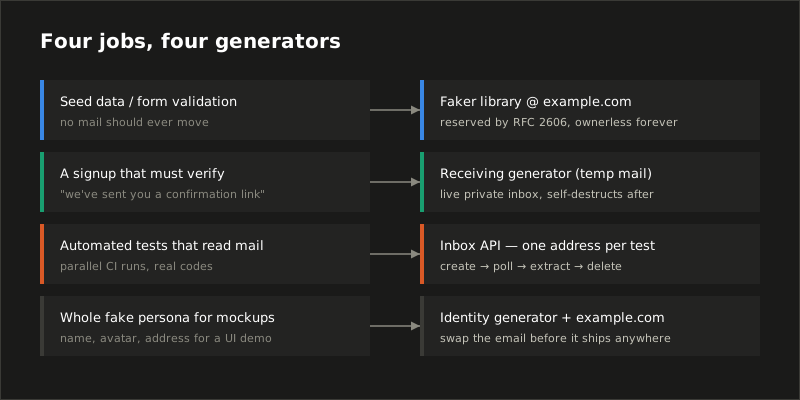
Four jobs, four right answers
| The job | The right generator | The wrong move |
|---|---|---|
| Seed data, fixtures, form validation | Faker library @ example.com / .test |
Realistic strings at real domains |
| A signup that must verify | Receiving generator (temp mail) | Invented @gmail.com strings |
| Automated tests that read mail | Inbox API, one inbox per test | Shared hardcoded test inboxes |
| A whole fake persona for UI mockups | Identity generator, email swapped to example.com |
Shipping mockups with real-looking addresses |
The third row deserves its sentence: in CI, "fake email generator" becomes an API call — POST /inboxes returns a fresh receiving address, the test registers with it, polls for the code, asserts, deletes. One generated inbox per test is what keeps parallel runs from reading each other's mail; the pattern, with working Cypress and Playwright code, is in our QA guide.
Where the trust question lands
Fake-email tools have a mild reputation problem, so it's worth being precise about what's actually risky. Generating randomness is not the risk. The risks are: fabricated addresses at domains you don't control (a stranger gets your mail — the only habit on this page we'd call genuinely dangerous), public inboxes holding real codes (pick a private-inbox service), and burning an address that an account will later need for recovery — a disposable inbox is for relationships you're happy to end, a point we've made bluntly enough elsewhere that we'll just link it: is temporary email safe?
If your next step is a signup form, the generator gives you a private receiving address in one click, and it deletes itself when the job's done. If your next step is a seed script, close this tab and write @example.com — that one's free everywhere, forever, by standard.
Sources
- IETF, RFC 2606 — Reserved Top Level DNS Names — the standard reserving example.com/.net/.org and the .test, .invalid, and .localhost TLDs for exactly this use.
- Hu et al., Towards Understanding the Adoption and Security Risks of Disposable Email Services, IEEE Symposium on Security & Privacy 2019 — measurement of registration and reset emails exposed in publicly readable disposable inboxes.
- Google, Getting messages sent to a dotted version of my address — the documented dot behavior behind "fake Gmail generator" claims.
- Our companion guides: how temporary email services work and test email addresses for QA.