A burner email is an address you can abandon at zero cost: not linked to your identity, holding nothing you'd miss, and replaceable in seconds. That's the whole definition — and it's stricter than it sounds, because the most common "burner" setup people describe (a second Gmail account) fails it on the first test. This guide pins down what actually qualifies, compares the three tools people mean when they say the word, and covers the cases where a burner is the wrong instrument entirely.
We run TempMaily, a disposable-inbox service, so we sell one of the three tools below. The taxonomy is honest anyway — including the rows where an alias service or nothing at all is the better answer.
Quick answer
A true burner email passes three tests: no identity linkage (creating it didn't require your name, phone, or existing email), nothing to lose (when it dies, nothing of value dies with it), and free replacement (the next one is a click away). A temp-mail inbox passes all three — it exists in one click and self-destructs on schedule. An email alias (SimpleLogin, addy.io, Apple Hide My Email) passes the burn test but not the anonymity test: it forwards to your real inbox and revokes cleanly, which makes it the right burner for accounts you'll keep for months. A second Gmail/Outlook account fails two of three: it's tied to your phone and devices, and abandoning it means losing whatever accumulated there. Use temp mail for one-shot signups, aliases for durable-but-revocable, and your real address for anything involving money or recovery.
Where the term comes from, and why the metaphor is precise
"Burner" is borrowed from prepaid phones — bought with cash, used for a while, dropped in a bin. The phone worked as a burner because of three properties, not because of anything about phones specifically. Nobody's name was on it. Nothing on it mattered. The next one cost twenty dollars.
Map those onto email and you get a useful instrument for judging any "burner" setup someone recommends:
- No identity linkage. If creating the address required your real email, phone number, or a logged-in account, there's a durable record connecting it to you.
- Nothing to lose. If abandoning the address strands accounts, receipts, or contacts you care about, you'll hesitate to burn it — and a burner you hesitate to burn isn't one.
- Free replacement. If the next address takes effort (new account, new verification), you'll reuse the old one across sites, and reuse is exactly what lets trackers connect your activity.
Run any candidate through those three and the marketing sorts itself out.
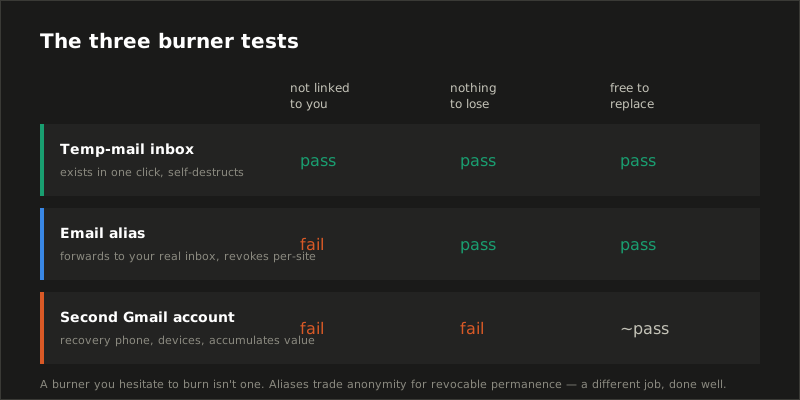
The three things people mean by "burner email"
Temp mail: the literal burner
A disposable inbox from a service like ours exists the moment you open the page — no signup, no password — receives mail at a generated address, and deletes itself on schedule. Scored against the tests: no identity linkage (nothing was asked), nothing to lose (the inbox is empty by design and dead by default), free replacement (refresh the page). This is the tool for the one-shot cases: a download gated behind "enter your email," a Wi-Fi portal, a free trial you'll cancel, a site you don't trust yet.
One structural caveat decides which service you use: on some disposable providers, inboxes are public — anyone who types the same inbox name reads the same mail. Researchers who monitored public disposable inboxes for a 2019 IEEE Security & Privacy paper collected 2.3 million messages and found account-registration and password-reset emails by the tens of thousands sitting in the open. A burner whose contents strangers can read fails a test we didn't even need to list. Private-inbox services (TempMaily among them — that's the design difference we built around) close that hole.
Aliases: the burner that lives in your real inbox
An alias service generates addresses like k7f2q@yourdomain that forward to your real inbox. Each alias revokes individually: when the address you gave a shop starts receiving spam, you kill that one alias and everything else keeps working. Against the tests: replacement is free, burning is clean and surgical — but identity linkage is the point, since mail lands in your permanent inbox. That's not a flaw; it's a different job. Aliases are the right burner for accounts you intend to keep — newsletters, shops, forums — where you want revocability without losing the account. The full comparison is in email alias vs temp mail.
The second Gmail account: mostly not a burner
The folk version. It fails the identity test the moment Google asks for a recovery phone, and it fails the nothing-to-lose test the month it quietly becomes the login for three services you actually use. It also fails a test aliases and temp mail pass without trying: replacement isn't free — new-account signup friction is real and rising. What a secondary account is good for is a persistent low-stakes identity: game accounts, a public-facing address for classifieds. Just don't call it a burner, and don't expect the Gmail dot trick to turn one inbox into several identities — every dotted variant is the same fully identified account.
Choosing in practice
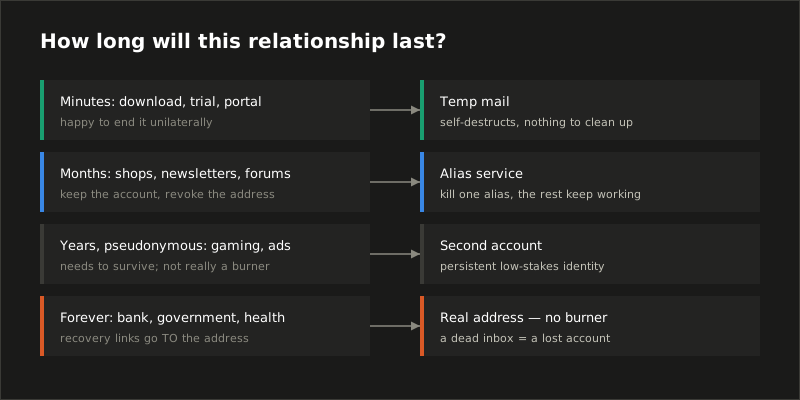
| Situation | Right tool | Why |
|---|---|---|
| One-time download, trial, Wi-Fi portal | Temp mail | Fully passes all three tests; inbox self-destructs |
| Shop or newsletter you'll keep | Alias | Revocable per-site without losing the account |
| Persistent pseudonym (gaming, classifieds) | Second account | Needs to survive; burnability was never the goal |
| Anything with money, ID, or recovery | Real address | Burning the address would burn the account — see below |
| Testing signup flows in code | Receiving API | Programmatic burners, one per test |
Where a burner is the wrong tool
We'd rather lose the pageview than the trust, so plainly: some signups should get your real, permanent address every time. Banking and anything financial. Government services. Health care. Your employer. Any account where losing access is expensive — because password recovery flows go to the address, and a recovery link sent to an inbox that no longer exists is an account you've lost. The occasional search for "temp mail for banking" has a one-word answer: don't. The same logic applies to anything you'd be sad to lose in five years; burners are for relationships you're happy to end unilaterally.
Also expect some sites to simply refuse: disposable domains sit on shared blocklists, and signup forms check them. That's a known trade, not a malfunction — we wrote up the mechanics in why websites block temp mail, along with the honest workarounds (usually: an alias, or deciding the site has earned your real address).
Getting one in ten seconds
The reason temp mail is the default answer to "how do I get a burner email" is that the entire acquisition process is: open the inbox page. The address is there, private, already receiving. Use it for the signup in front of you, copy the verification code when it lands, and close the tab. No password to store, no account to remember, nothing to clean up — the burning happens on its own, which was the whole idea. If you find yourself wanting the same burner to last longer or to reuse it across sites, that's the signal you've drifted into alias territory, and the alias comparison is the next thing to read.
Sources
- Hu et al., Towards Understanding the Adoption and Security Risks of Disposable Email Services, IEEE Symposium on Security & Privacy 2019 — the measurement study of public disposable inboxes cited above, including registration and password-reset emails found publicly readable.
- Google, Create a Gmail account — account creation and verification requirements referenced in the secondary-account section.
- Our companion guides: email alias vs temp mail, can temporary emails be traced?, and how long does a temporary email last.