"Best email testing tools" listicles keep ranking 21 products against each other as if they were interchangeable. They are not — email testing is four different jobs, and a tool that is best-in-class at one is useless at another: Litmus cannot receive your signup code, and Mailosaur will not tell you how your template renders in Outlook. Name the job first and each shortlist collapses to two or three serious options. That is this post: the four jobs, the honest shortlist for each, and where the free tiers actually end.
Disclosure: we run TempMaily, which competes in exactly one of the four categories (receiving). The other three categories contain no product of ours, so those recommendations are as neutral as it gets.
Quick answer
Receiving real inbound mail in tests: Mailosaur, MailSlurp, or TempMaily's API. Trapping your app's outbound mail: Mailtrap hosted, Mailpit self-hosted. Rendering across clients: Litmus or Email on Acid. Deliverability and spam placement: mail-tester first, GlockApps at scale. These four categories compose — most teams eventually run one from each — and no tool in one category substitutes for another.
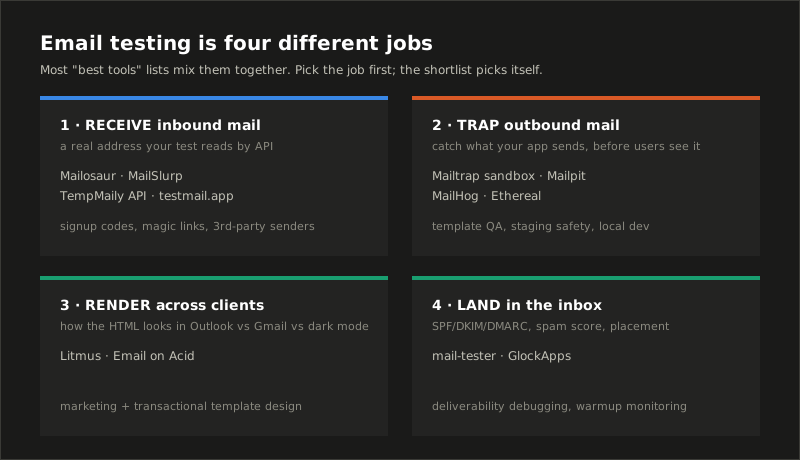
Job 1: receive real inbound mail in tests
The question this answers: "can a user actually receive and use the email my flow depends on?" Signup codes, magic links, password resets, third-party invites — anything where the test must read a message that genuinely traversed SMTP.
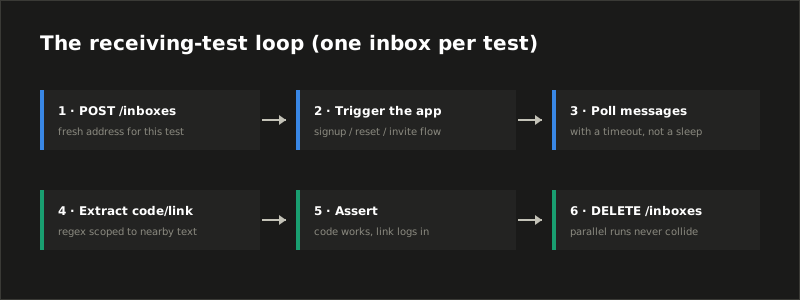
The tools are API-first inbox services: your test creates an address, hands it to the flow under test, polls for the message, extracts the code, asserts, and deletes the inbox.
- Mailosaur — the QA-team incumbent: mature SDKs, SMS testing alongside email, team pricing to match.
- MailSlurp — deepest API surface (inbox permutations, attachments, webhooks); generous for individual developers.
- TempMaily (us) — one flat $9.90/month Premium includes the REST API and webhooks: create inboxes, read and delete messages, register signed webhooks with a
xtm_Bearer key. It also ships an MCP server, so AI agents can drive inboxes as tool calls — useful now that agents sign up for things themselves. Working Cypress and Playwright recipes are in our docs. - testmail.app — simple namespace-based addresses and JSON API; a solid budget pick.
- Mailinator — the famous name, but the free tier's inboxes are public and the API is enterprise-priced; our Mailinator alternatives comparison covers when that trade is and isn't worth it.
One rule regardless of vendor: one fresh inbox per test. Shared static inboxes plus parallel CI runs produce the flakiest tests in the entire e2e universe — the full pattern is in email testing in CI.
Job 2: trap your app's outbound mail
The question: "is the email my app sends correct — without spamming anyone?" Here nothing needs to reach a real mailbox; the tool impersonates an SMTP server and catches everything.
- Mailtrap Email Sandbox — the hosted standard: point staging's SMTP at it, get team-shared inboxes with HTML/source/spam-score views for every trapped message.
- Mailpit — the modern self-hosted pick and our default recommendation for local dev and CI: a single Go binary or container, real-time web UI, REST API for assertions. (It superseded the venerable MailHog, which is no longer actively maintained but still everywhere.)
- GreenMail — JVM-native in-memory SMTP/IMAP; starts from a JUnit rule, zero network. The right shape when your tests must run with no external processes at all.
- Ethereal — Nodemailer's fake SMTP service: auto-generated throwaway credentials, messages viewable on the web, never delivered. Fine for quick Node experiments.
The trap-everything model is also the guardrail that keeps a staging misfire from emailing your production user table. If your staging environment can send real mail today, fix that before reading further.
Job 3: rendering across clients
The question: "does this template survive Outlook?" No inbox API can answer it; you need screenshot farms that render your HTML in dozens of real clients, dark mode included.
- Litmus — the category leader; previews across ~100+ clients, plus checklist and analytics features. Priced for marketing teams.
- Email on Acid — the main alternative, similar coverage, often friendlier pricing.
Honest scoping note: transactional emails (codes, resets) mostly use simple layouts where rendering risk is low — a receiving-API test that asserts the code is present usually suffices. Rendering suites earn their cost when design-heavy marketing templates meet Outlook's rendering engine.
Job 4: landing in the inbox at all
The question: "why is it going to spam?" Different failure domain entirely: DNS records, sender reputation, and content scoring rather than code correctness.
- mail-tester.com — send one email to a generated address, get a free itemized score: SPF, DKIM, DMARC, blocklist presence, content flags. The right first move for any deliverability complaint.
- GlockApps — seed-list placement testing at scale: send to a spread of real provider inboxes and see where each lands (inbox, promotions, spam) plus ongoing monitoring.
If you run your own sending domain, start here before touching templates — a missing DMARC record outweighs any subject-line tweak. Our own writeup of verification emails not arriving walks the same diagnosis from the receiving side.
The decision, compressed

| If your team is… | Start with |
|---|---|
| Testing signup/reset flows end-to-end | Receiving API: TempMaily, Mailosaur, or MailSlurp |
| Building templates, protecting staging | Mailtrap (hosted) or Mailpit (self-hosted) |
| Shipping design-heavy campaigns | Litmus or Email on Acid |
| Fighting the spam folder | mail-tester first, GlockApps if it recurs |
| All of the above | One per category — they compose; none replaces another |
Common mistakes
- Buying one tool for two jobs. The recurring one: adopting Mailtrap and then wondering how to test inbound third-party mail (it can't — that's Job 1), or paying for Mailosaur and using it as a staging trap (wasteful — Job 2 tools are near-free).
- Sharing one inbox across parallel tests. Test A reads test B's code; the suite goes red on Tuesdays. One inbox per test, created and destroyed inside the test.
- Polling with
sleep(10). Poll with a deadline and early exit. Fixed sleeps make suites slow and flaky simultaneously — an impressive double. - Extracting codes with a greedy regex.
\d{6}matches the year in the footer. Scope the regex to text near the code, as in our password-reset and magic-link testing guide. - Using public free inboxes for anything real. Mailinator-style public inboxes are readable by the world; researchers found tens of thousands of real registration emails sitting in them. Test data only, never real QA account credentials.
Where to start today
If Job 1 is your job: a TempMaily inbox is live right now without a signup — poke at the manual flow, then wire the same thing through the API when it earns automation. For everything else above, the free tiers of Mailpit and mail-tester will teach you more in an afternoon than any listicle, this one included.
Sources
- Mailpit and GreenMail — self-hosted outbound-trap documentation.
- Mailtrap, Mailosaur, MailSlurp, testmail.app — hosted tools referenced per category.
- mail-tester and GlockApps — deliverability scoring and placement testing.
- Hu, Peng & Wang, Towards Understanding the Adoption and Security Risks of Disposable Email Services, IEEE S&P 2019 — the public-inbox registration-mail findings behind the last common mistake.